When I’ve previously written about password management, I’ve usually divided my explanations evenly between two approaches to handling it: the KeePass way and the non-KeePass way. This time, though, I feel obliged to spend the whole post on the KeePass way, where some recent app improvements have sweetened the deal for those who might find it their way.
Among the challenges I’ve identified for the KeePass way were (a.) migration from the non-KeePass way and (b.) cross-device sync. Here’s how two major apps in the KeePass-compatible arena have addressed these lately.
One “way” or the other
Perhaps the most widely touted feature of v.2.7.7 of the FOSS, cross-platform KeePassXC app may be its new support for passkeys. However, what I found most compelling is its tremendously enhanced ability to import data from 1Password and Bitwarden, perhaps the two biggest names from the non-KeePass way of password management.
It’s always been sort of possible to bring in credentials data from these sources, but often only through CSV files — which tended to result in a messy, lossy, and overly manual importation process. Now, KeePassXC can import from more of 1Password’s proprietary export formats (as well as Bitwarden’s encrypted JSON exports), making for a much cleaner and more comprehensive result.
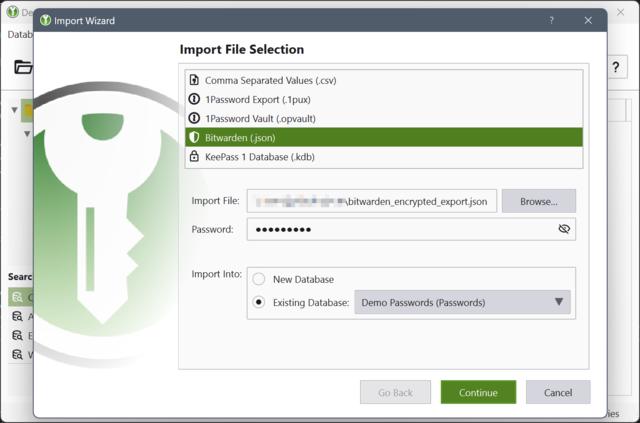
KeePassXC v.2.7.7 Import Wizard.
Image: KeePassXC blog.
While the Apple-only Strongbox1 app has also been stepping up its importation game in the last couple of years, the ability of KeePassXC to run on just about any desktop or laptop computer gives additional significance to these latest improvements in the latter app.
Singin’ the same song
Some adherents to the KeePass way are extremely reluctant to put their secrets on any cloud storage, which makes it difficult or impossible for them to synchronize their passwords among multiple devices. As you can imagine, this can be a severe disincentive to those who might already be doubting their choice of password management approaches — or, in extreme cases, whether the whole thing is worth the trouble.
But, for any KeePass way aficionado who wants to sync passwords among Apple devices, there’s relief in Strongbox’s Wi-Fi Sync feature.2 It syncs KeePass-compatible data among all such devices using the same network, requiring no cloud storage of any kind. And don’t be misled by Wi-Fi Sync’s name: it works even for a device using a hard-wired connection.
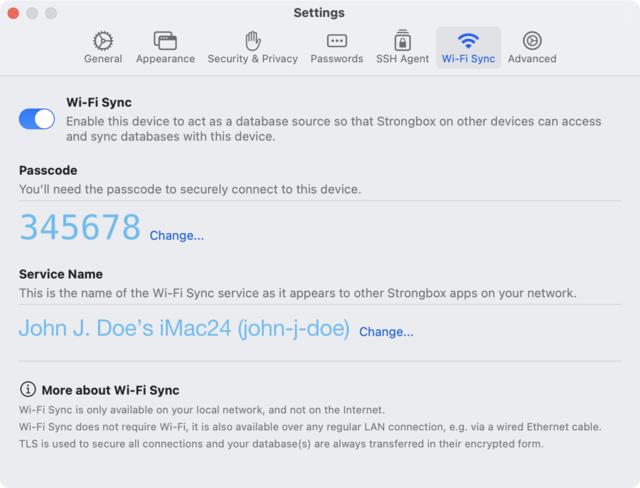
StrongBox Wi-Fi Sync settings (some data simulated).
Here’s one particularly cool aspect of Wi-Fi Sync. Let’s say that one of the connected Apple devices is taken outside of the network and its user makes changes to the KeePass database during that period. When the device is back on the network, it’ll automatically sync back those changes and receive any changes that occurred on other network devices during its absence.
I wonder whether this Strongbox-only (and, thus, Apple-only) feature is something which could eventually be ported, forked, and/or reverse-engineered to be more cross-platform. In the meantime, though, folks in all-Apple environments might find Wi-Fi Sync a compelling reason to select Strongbox for toeing to the KeePass way.
Update, 2025-03-24: See also “Matters of trust.” ↩︎
Requires purchase of Strongbox Pro. ↩︎
Latest commit (851c1a07e) for page file:
2025-03-24 at 3:02:51 PM CDT.
Page history